Wednesday, 20 July 2011

Immediate Plan

1. Do all the junk scenes necessary for, say, the first 3 junk positions.
2. Implement the navigation method.
3. Make the new Bridgedata module, compile and test.

Hello again, GFORGE

To be honest, I was happier with GFORGE's terrains than I am with Terragen's, so I dug out the old W98 Notino, and verified that it would still run GFORGE. It gives me another development route problem, but I am relieved that I can get back to GFORGE if I have to.

Tuesday, 19 July 2011

Goodbye, GFORGE. Hello, Terragen

Oh, dear. GFORGE no longer works for me, not in Windows XP and not in a DOS cmd box within Windows XP. Rather than drag out my old Windows 98 laptop to try that, I downloaded a free copy of Terragen, which does a similar sort of thing.

Unfortunately, Terragen doesn't output in a form that POVray understands as a height field.

But after much googling, I discovered For Export Only (FEO) which is a set of plugins for Terragen, including one that creates a BMP file that POVray understands.

Ah, well. No-one said it was going to be easy.

Friday, 15 July 2011

Sprite rocks.

Next task is to devise a number of rock sprites. I'll try several of these GFORGE terrain maker files.

Aide-memoire for the Junk navigation map

This entry is PROVISIONAL. It will be updated as necessary.
Route S start -> F finish * = defined


W X Y Z
1 * - F * - *
| | |
2 * * - * *
| | |
3 * * S *
| | | |
4 * - * * - *

Y3 Start. Sprite rocks stbd
Sprite cone port
Y4 Open sea. Sprite cone stbd
Z4 Rocks 2 + pylon on port - visible from cockpit port, bow port and cabin port
Z3 Sprite rocks port
Sprite cone port
Z2 Sprite rocks stbd
Sprite cone port
Z1 Sprite rocks port and stbd
Rocks 3 + pylon fwd - visible from bow fwd only
Y1 High Rocks fwd - visible from bow fwd only
Y2 Rocks 2 stbd
X2 Rocks 1 fwd. Visible bow fwd only
X3 Girders
X4 Open sea. Sprite cone port.
W4 Rocks fwd.
W3 Open sea. Sprite cone stbd.
W2 Wreck port. Sprite cone stbd.
W1 Rocks 1 + pylon on stbd - visible from cockpit stbd, bow stbd and cabin stbd
Jade on stbd bow - visible from bow fwd only
X1 Finish. Jade fwd - visible from bow fwd only

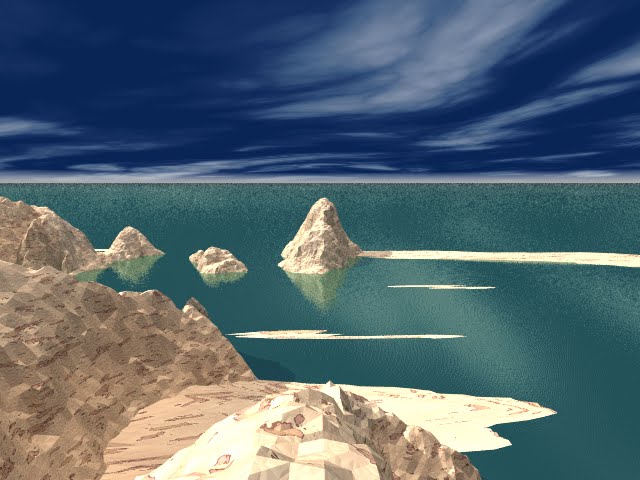
Rocks at sea

One of the sets of rocks I've been developing for scenery purposes. The texture used is Cork, which appears as a nice arid island. Note the shadow of the junk's sails on the sea in front. In use, there will be a pylon with guidance 'traffic lights' on the island.

Thursday, 14 July 2011

Back in harness

Having been distracted for several months by, for example, two editions of Mythaxis Magazine (worth a read), a golfing holiday, a new palmtop computer, new books and so on, I made a restart, two nights ago on my POVray creations.

In fact, though I only hinted about it, I made a plan for the first part of the game that involved a bit of varied scenery. At first, I was envisaging sprites to supply even static scenery. Now, I'm more inclined to a mixture of sprites and static images.

In the original post, I reproduced my notebook pages here. Totally incomprehensible, I'm afraid. I removed them.

The plan is to gradually reveal the route to be followed by indicating previous and next positions by traffic light style markers on shore or on buoys. The map is gradually revealed on the screen in the cabin. When the problem has been solved, the player can go straight to the destination, but the first time he has to either guess it or work it out by following the route.

Monday, 13 December 2010

POVRAY woes

In rendering the junk final images, I've encountered problems with ropes and the cabin textures. It only needs time, as ever. Even on my quickest machine, rendering takes hours per scene, and every time I get a rope position wrong, it has to be done again. I think I'll use cylinders and tori to get the anchor positions right, before final render. We're getting there. At least I'm working on it virtually every night now.

I've embedded the instructions for multiple renders in the junk.pov code. In the past it's always taken forever to remember how to do it.

KFI and KFF are the initial and final frame nos (each scene's file label is appended with frame no, which corresponds to scene no)

KI and KF are the initial and final clock values which I use to change the scene no.


// "animation" command line string (paste in empty command line box above)
// +KFI100 +KFF102 +KI0 +KF2

// comment out next line if animation in force
#declare scene=100;

// comment in following line if animation in force
// #declare scene = clock+100;

MP3 player

An interruption - I may have found a suitable mp3 player (by Neolao) to substitute for the rather awkward MIDI player in the Javascript. (Note to self - see samsung/notino/bridge)

Friday, 10 December 2010

Starting to Build the new version

Now working on changing BridgeData.java to include the junk section.

Had to re-discover the build route - it's more than a year since it was last changed. I've improved the build environment, and installed up to date JREs.

Every time I start a scene, I trip over something I've forgotten, but it's progress, constant progress.

Monday, 15 November 2010

The Junk Puzzle

Yup. Got it now. I've devised a 16 point maze - not really a maze, because there's many ways through it, and when you've solved it, you can go straight to the end next time you play. Each point in the grid, let's call it, has its own ID lights, and a different set of scenery around it, viewed from the junk. There are ten positions on the junk, bow, stern, facing various ways, and there is a different scene visible from each of these junk scenes, depending on the ID of the current point in the grid.

So... the scenery is delivered by sprites rather than background, and the 160 possible visible scenes are reduced to ten with different sprites at each location.

Each point in the grid indicates the adjacent IDs and the navigation system allows the player to move to whatever ID he favours.

It's quite a lot of code, but it saves masses of scene files. Instead of 160 scenes, we have just the 10 on the junk, the background sprites being imposed on an empty sea/sky.

Thursday, 11 November 2010

Feverish Activity behind the Scenes


Over the last few weeks, I've concentrated on a variety of articles on the junk - table, chairs, a bucket etc.

The next stage is to build it into a new version of the example game, but that will involve some new work on the Sprites, to give the water a more realistic appearance.

I also have to re-write the BridgeData module to control the new scenes.

I am a little conflicted on the "Junk Puzzle" - i.e. how to get from the initial scene of being on the junk to getting to the island. It mustn't be too obvious - the player should have to think about it - but I don't want it to turn into a maze.

Tuesday, 7 September 2010

Work re-commences.

I returned to this project yesterday. I am designing the navigation system for the junk, one that uses coloured buttons and a map to lead the user round a number of locations at sea. The view outside the cabin and from the deck has to be consistent, with the appropriate angles of buoys and the island. These will have to be installed as sprites, so that we don't have to make a scene for every viewpoint.

The cabin of the junk, from which navigation takes place, looked so stark that I'm installing a carpet in it.

I still haven't figured out how to organise the puzzle. I don't want just a maze or point and click shooting gallery. There has to be some substance to the puzzle that looks soluble but isn't too easy.

__________________________________

Once I get the navigation in place, I'll do another test version. Watch this space.

Friday, 21 May 2010

Odd Comments

Odd Comments
Just a little side issue here. I keep getting comments on the blog that I can't publish because the commenter's name and comment are rendered in a font that my browsers (none of them, and I have many) cannot render. If you are not having your comments published, then this is the reason.


Break in Transmission
The recent pause was due to an extended period of working abroad without access to my code and Povray sources. Normal service will be resumed shortly.

Sunday, 18 April 2010

Latest Junk Picture

I just finished this little beauty this morning. Note the ropes and the pylon. It took FIVE HOURS, THREE MINUTES AND TWO SECONDS to render! That was with a number of time-wasting options enabled, particularly the Rope functions.

Friday, 16 April 2010

Pylons

I'm going to have pylons in the water for the junk to use in navigation. These pylons will have a sort of road map on them, leading to the island.

Things are moving much faster for me now. There's a thrill of anticipation that I'll soon have a second working example with much more substance to it.

Monday, 12 April 2010

Strategy Again

I am finding my slow pace of development irksome. I have today been thinking of strategies to get another short example game out quite quickly.

Among these strategies are:

Complete the first section of the game quickly, without further refinement, and forgetting the next section.

So:
- Junk
- Dockside doors
- Elevator

I'll just get on with that.

Monday, 5 April 2010

Comments on POVray techniques

Following up on the comments in the previous post, I should point out that I can optionally apply a grid to any scene. The grid is a series of cylinders, set 5 units apart and centred on the origin of the scene. That gives me an accurate measure of where to put an item. I build the item and rotate it at origin, then move it to the desired location.


The animation (which I may use for a multi-render batch file), briefly, works like this:

"POV-Ray supports an automatically declared floating point variable identified as clock (all lower case). This is the key to making image files that can be automated. In command line operations, the clock variable is set using the +k switch. For example, +k3.4 from the command line would set the value of clock to 3.4. The same could be accomplished from the INI file using Clock=3.4 in an INI file.

If we do not set clock for anything, and the animation loop is not used, the clock variable is still there - it is just set for the default value of 0.0, so it is possible to set up some POV code for the purpose of animation, and still render it as a still picture during the object/world creation stage of our project.

The simplest example of using this to our advantage would be having an object which is travelling at a constant rate, say, along the x-axis. We would have the statement

translate <clock, 0, 0>"

Saturday, 3 April 2010

Green Shoots of Recovery

Last night, I dusted this project off, improved the staircase algorithm, and added a staircase to the Jade island.

One of the problems is the length of time each render now takes, even for a minor adjustment. However, once some new component is settled, I think it's probably going to be possible to set up a batch rendering job to produce all the renders anew, every time a significant component is added.

I have decided to inch the project forward in its incomplete state, adding as many of the individual stages of the game as possible, even based on an incomplete background picture.

For example, if a new bridge, building or piece of furniture is added to the island, then I might have to re-render a number of backgrounds later, and I might have to modify the positions of sprites to an extent, but better incomplete scenery at this stage rather than incomplete gameplay.

Monday, 14 December 2009

Update

Like most bloggers, I sometimes take time off from blogging.

I have had a number of interruptions, including a trip to Barcelona, work on Mythaxis and (guiltily) replaying Myst III - magnificent scenery.


I haven't been totally idle, though. Since I last blogged, I have refined the Junk and modified a spiral staircase algorithm to give me swooping stairways. I'll post some examples real soon now. And Christmas hols are coming up. I should get some more design done then.

Friday, 11 September 2009

Reporting completion on the Junk

It's been a slowish business, but I'm now reasonably happy with the junk. After all, it's only a platform for transport and a piece of furniture to view from afar.

As a sprite, it'll be viewable at various sizes and seen from left or right, but not animated.

I'll do a separate animation of the waterline splashing along, so it appears to be moving, and calculate speeds / sizes for various manifestations of it.

Monday, 17 August 2009

Yet More Junk

The latest version of the junk and its dinghy (which shares the junk's hull shape) sans ropes, but ropes will appear soon, thanks to Chris Bartlett's Rope macros and "after-sales support".

Benjamin Roux has also volunteered to help with the project.

Tuesday, 28 July 2009

More Junk

Got the masts and sails in the junk. Had some difficulty with the decks, because patches are not 'real' shapes and differences, intersections etc don't work the way you'd expect. Solving it by fitting a deckhouse and then painstakingly filling in the areas left with boxes and polygons, which will lead to a more authentic final appearance. The picture here is hull, deckhouse, mast and sails.

Wednesday, 22 July 2009

Junk


Put together the hull for a Chinese Junk, using 3 bicubic patches (actually 2, because the port and starboard hull sections are mirror images of each other.) The view is of the transom (rear end) of the boat. I took the measurements for the hull profile from a design on the internet.

Next, the decks and masts.

Saturday, 13 June 2009

A Few Extra Plot and Image Points

I envisage a sea cave that the boat can sail into, but only when the portcullis across its entrance has been raised. So the player is at a land entrance to the cave, and can raise the gate from there, but the dock in the cave is only reachable by the boat sailing in.

Also, I started to devise a new spiral staircase function where the steps were not connected at the centre. I realised yesterday I could use an existing spiral stair function, and cut the centre out of it by differencing with a cylinder. I'd still have to add vertical struts on the edges for realism - a staircase can't just hang in the air - but the main job will be done.

Fan animation. I observed how a fan opens. The rearmost blade of the fan stays still, and only the top blade is showing. The top blade flips out, pulling the next and the next and so on.

I suspect the best way to create the images for this in povray would be in reverse. Start with the open fan as an array of blades, coat the array with the image, then for subsequent frames, pull the top blade back over the one underneath it, then pull them both back over the third, and so on, until the fan is closed. I'm not entirely sure this is possible, though.

Friday, 12 June 2009

A Bit of a Brain Dump


I haven't posted very much lately, partly because I was getting out the next issue of Mythaxis, but I have been thinking about it a lot. I have decided to start the game on a boat - a Chinese Junk. The boat can transport the player to various locations around the island as necessary, and I would use a chart table below decks to direct the boat to the destination.

The boat will also contain a number of useful items - including a fan to transport the player back to the junk, or summon it.

I already have a boat in povray. I just have to elaborate it a bit.

In thinking about this, I realised we must have a rocking effect for the scenery when on deck. I considered using an array of g2d rotated images for this, but I think it'll be easier just to pre-rotate the images in Paint Shop Pro and load them as sprites. I can arrange that they not be the whole size of the applet window by placing static sprites of portholes, sails, deckhouses etc to frame the background which will be a lower priority sprite.

I was briefly worried about fan management, because there are several fan functions, which I solved by having a hot spot on the open fan, and by having a special room for open fans.
  • pick up (closed) fan - double click when fan not carried
  • drop (closed) fan - double click when fan carried
  • open fan - single click when in inventory 'room' only and fan is closed
  • close fan - single click (not on fan hot spot) when in inventory 'room' only and fan is open
  • use fan - click on hot spot on open fan
Sounds complex, I know, but I think it'll be natural. I may remove the restriction on opening the fan only in the inventory. Fan animation is going to be fun!

I have come to the conclusion that I have to fill out the game in povray before I do any more gameplay. I just keep realising that the game isn't rich enough without a good deal more articles in it. The game's going to be small enough without looking impoverished. So the next big push is scenery.

I still haven't bitten the bullet of music in mp3, but I'm not too worried about that.

Friday, 22 May 2009

Break in Transmission

A whole month since I've had time to concentrate on The Game, but watch this space...

Wednesday, 22 April 2009

Version 1.1 now available

A zipped version with all the fixes to date is now available.

The original (lame) example now runs on 1.1 code.

Both of these can be accessed via:

http://amazonsystems.phpzilla.net/

Thursday, 16 April 2009

What Next?

I think I have reached a suitable point at which to preserve the current state of the code. So I'll upload version 1.1 in due course.

Next stage will be new artwork, followed by a new puzzle, then the music problem must be solved.

Scale and Flip facilities

I have now added scale and flip facilities, to allow the same image to be used for a sprite at different sizes and reversed.

Different scale in x and y direction is possible, invert, mirror and all three.

In the diagram:
1. Normal sprite
2. 75% scale on both x and y axes
3. 75% scale on both x and y axes plus mirror
4. 75% scale on both x and y axes plus mirror plus invert

Saturday, 11 April 2009

Priority

Having a little trouble with the priority of sprites, but nothing desperate yet. I have a feeling that monkeying with vector elements is the cause of the problem. I may have to try a different approach to sorting the sprite list.

(later) Schoolboy error. I was using insertElementAt() instead of setElementAt().

Thus - the Vector of Sprites appears in slist:
//      This is a sinking sort. On first pass, the highest
// priority sprite arrives at the bottom. On second,
// the next highest arrives at second bottom, etc.
// Sprites of the same priority remain in their
// original sequence with respect to each other.
for (ii = 0; ii< slist.size()-1; ii++)
{
for (jj = 0; jj < (slist.size()-ii-1); jj++)
{
spare1 = (Sprite)slist.elementAt(jj);
spare2 = (Sprite)slist.elementAt(jj+1);
if (spare1.getPriority() > spare2.getPriority())
{
slist.setElementAt(spare1, jj+1);
slist.setElementAt(spare2, jj);
}
}
}

Thursday, 9 April 2009

Gull motion bug fixed

I was dissatisfied with the original gull motion (see 30 December 2008 entry). Found out what it was today.

The previous table had the gull stopping for an extra beat at zero deflection. Now deflection goes from +3 to -3.

Monday, 6 April 2009

Important bug solved

Sorted. The solution was to drop anything being carried into the limbo room before doing the Restore. The bug was caused by the clash of an object being simultaneously carried and restored to an uncarried situation.

Also, and in connection with this bug, I added the "limbo" room to the system. All adventures need a limbo room in which to store objects that aren't anywhere else. For example, a sprite that has been destroyed, or has not yet been revealed can be left in there where it will do no harm until such a condition arises whereby the game writer decides to put the object back in play. "limbo", like "inventory" becomes a compulsory scene in the system, because it is referred to in the RestoreGame function by name.

After another sweep through the code to pick up any other anomalies or improvements, I'll publish version 1.1 in both source and runtime.

Saturday, 28 March 2009

Important bug

I've found a bug that sometimes, on a restore, leaves a sprite lying on every scene, a sprite that cannot be picked up. I can't reliably reproduce it. I thought at first that if you started a new game and restored a situation in which you were carrying a sprite, then it happened, but it doesn't seem to be that. Ho-hum... The position it occupies on the restored scene and all other scenes is the same as its original (i.e. game start) position. Later (much later, days later) I stumbled upon the bug again and can now reproduce it. It happens if I put the key in the inventory, then exit the inventory and save. Then I enter the inventory and pick up the key and restore. Now I can reproduce it, it should be simple to fix!

Friday, 27 March 2009

Development problem solved

I was finding that new versions of the code were not being acknowledged in Firefox, so that even if I made a change, it kept the old code.

Discovered that you have to bring up the Java console and type x to clear the classloader cache. At first, IE didn't seem to have the same problem, but that was probably because I restarted IE every time I tested it.

Anyway, to be on the safe side, I clear the classloader cache every time now.

And using mousePressed() instead of mouseClicked() works a treat. The mouse response is very much better now.

Development system

Over the last few days, I've set up a simple development system using command line calls to javac etc. I've installed EZ Document Safe to keep the sources and versions in order.

The good news is that the original code still compiles and runs.

I have found out why the mouse click doesn't work so well. If you drag the mouse a little when you press, you don't get a Clicked event; you may or may not get a Dragged event; you may get both; and it all depends on the JRE platform, the timing and how far it was dragged. There's a certain amount of discussion on SunWeb about the matter, and I used a test application to see what was going on.

I've devised a new system which ought to work on all platforms. I'll try it soon.

I have also downloaded JLayer, an mp3 player. It works in free-standing mode, but I don't know how it'll fare when I try to incorporate it into my code. I may just run it in a separate applet like the current midi ones.

Thursday, 26 March 2009

Some Story and Setting Outlines


Chinese Myst - Ideas


Major features :
o 3 mountains, each with a different character
o Bridges which need to be deployed
o Stairways and paths
o Pagodas, elevators, secret compartments and passages
o Monastery
o Nothing that's inappropriate technology, so use water power, clockwork, rope and pulley, steam etc.
o Locks, Puzzle locks, trapdoors
o Parts to fit in a matrix or jig-saw
o Logical puzzles

Despite appropriateness of technology, allow a little magic - tiny dragons, animated statues, self-igniting candles, ghost, fireworks, distant events in a crystal ball or animated picture or model. Also the fan is the equivalent of the Myst book (teleport mechanism).

Temple dogs, vases, chest of many drawers, lamps, screens, nested objects, musical instruments, cabinets, boxes, gong, water clock, teapot.

? Boat travel ? Aerial Runway

No language or writing, but perhaps some simple symbols.

Tiny model of the game world.

The Objective


(i) Must be revealed without verbal description so it could be demonstrated in a picture or a fan.

(ii) NOT the following hackneyed objectives:
a) Lord of Evil - destroy him... NO!
b) Imprisoned Princess - free her... NO! NO!
c) Save the Planet... NO! NO! NO!
d) Find the Ultimate Treasure... NOT AGAIN!

(iii) Well, perhaps a treasure hunt with trophy case. Collect seven treasures. The empty trophy case at the beginning, the filled one ends the game. A picture shows how the trophy case should look.